In many situations — whether you’re doing SEO monitoring, web scraping, regional testing, or simply trying to access geo-restricted content — a proxy can be invaluable. Free proxies offer a no-cost entry point: you don’t need to pay or commit to a plan, you can start quickly, and you get some level of IP masking or geo-spoofing for occasional use.
But free proxies have trade-offs: reliability, performance, privacy, and security are often not guaranteed. Studies of open/free proxies show that many are unstable, frequently offline, or even malicious.
That means, from a user’s point of view, the choice of which free proxy matters a lot. Below, we compare two representative approaches — a curated list of proxy IPs, and a browser-based free proxy service — and highlight why, for many use cases, a curated list may be the better choice.
Table of Contents
Two Common Approaches to “Free Proxies”-What They Look Like
OKKProxy Free Proxy List (IP-list style)
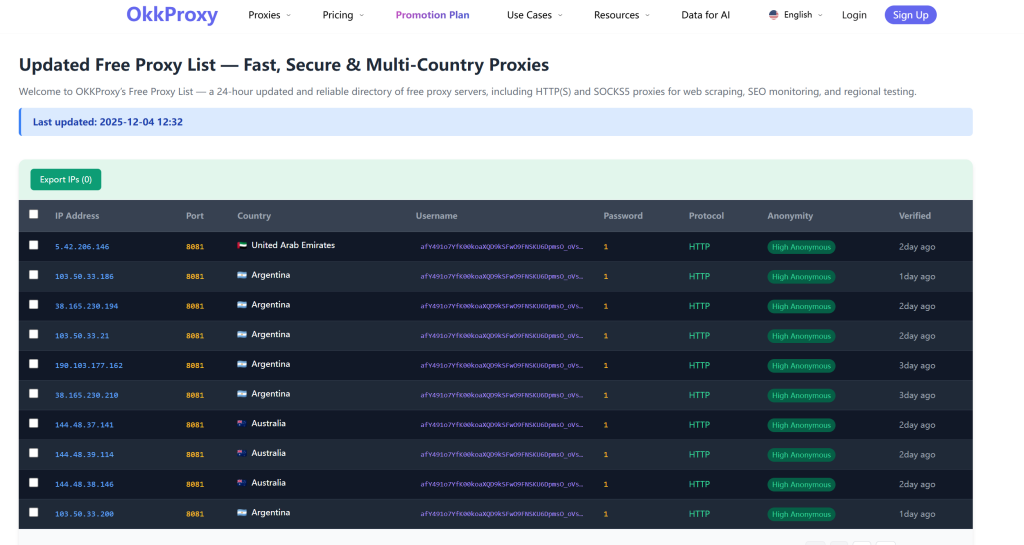
- With OKKProxy, you get a free proxy list — a directory of proxy server IPs (HTTP, HTTPS, SOCKS5) that are claimed to be updated regularly.
- Users can copy IP: port (and, when needed, authentication credentials) and use them directly in a browser, SEO tool, scraper, or other application.
- The free list gives flexibility: you can choose proxies from different countries, protocols (HTTP/SOCKS5), and — for the broader paid offering — even residential, ISP, mobile, or datacenter proxies.
How It Works
- Visit the free proxy list page.
- Browse the table of available proxies (countries, protocols, anonymity levels, uptime, etc.)
- Copy the IP:Port pair.
- Open your browser or app settings and paste the proxy information into the proxy configuration field.
Save and start browsing through that proxy.
User Experience
From a user perspective, list-based proxies feel flexible. You can choose the exact IP you want, switch countries manually, and match the proxy type to your task. This method also works with SEO tools, scraping scripts, or apps that require proxy configuration—giving you more control.
Pros
- Let you choose from multiple countries and protocols
- Works with browsers, apps, tools, scripts, extensions
- Allows IP rotation for testing or automation tasks
- Good for users who need more control rather than simplicity
Cons
- Requires manual setup
- Not ideal for one-click browsing
CroxyProxy Web-Proxy (Browser-based proxy)
- CroxyProxy offers a web proxy: you go to croxyproxy.com, type the URL you want to visit (e.g., YouTube, Facebook, etc.), click “Go”, and the site loads with CroxyProxy acting as an intermediary.
- There is no need to configure your browser or network settings; no software or extension installation is required (the basic version).
- CroxyProxy supports video and audio streaming, modern websites (with HTML5, dynamic content), and encryption (SSL), even if the target site doesn’t use HTTPS.
How It Works
- Visit the proxy website homepage.
- Find the input box.
- Type or paste the website you want to visit.
- Click Go.
The target website loads inside the proxy page.
User Experience
Users often choose this method when they want something quick and hassle-free. There’s no configuration, no settings, and no technical steps. It’s basically a “one-click” way to access a site anonymously or bypass restrictions.
Pros
- Extremely easy to use
- Zero configuration required
- Great for occasional browsing or blocked pages
- Works even if you cannot access browser settings
Cons
- Less flexible—only works through the browser
- Hard to use with tools, SEO software, or automation
- Usually slower for media-heavy pages
- You cannot choose specific IPs or rotate multiple IPs
From a User’s Perspective — Pros & Cons of Both Approaches
Here’s how using a proxy list (like OKKProxy) compares with using a browser-based free proxy (like CroxyProxy), from a user’s point of view.
Side-by-Side Comparison
| Feature | List-Based Free Proxy | Browser-Based Web Proxy |
| Ease of Use | Requires setup | Very easy, one-click |
| Control Over IP | High | Low |
| Best For | Testing, SEO, automation, tools | Quick casual browsing |
| IP Rotation | Manual or scriptable | Not available |
| Speed & Reliability | Varies by proxy | Depends on the host server |
| Privacy Level | Depends on proxy type | Proxy handles all traffic |
Real-World Use Cases
When List-Based Proxies Make More Sense
- From a user’s standpoint, this method works best if you:
- Need multiple IPs for testing across regions
- Use SEO tools or automation software
- Want to rotate proxies for scraping or data collection
- Prefer control over the IP country and protocol type
When Web-Based Proxies Are More Convenient
- Users often choose this method when they:
- Just need to load a blocked website quickly
- Don’t want to change browser settings
- Only need temporary or light usage
- Are on a shared or restricted device (school, workplace, library)
Strengths of the List-Based Method for Practical Users
Without focusing on specific brands, it’s clear that list-based proxies tend to be the better choice for users who do more than casual browsing. You get more flexibility, more control, and more compatibility with different tools. Even though setup requires an extra minute, the payoff is much greater—especially if you need proxies for work, testing, or repeated tasks.
Many users also appreciate the transparency of seeing the IPs directly. It makes it easier to test reliability, switch options, or manually choose a proxy that fits your needs.
Final Thoughts: Which Method Fits Your Needs?
Both free proxy methods have their place, and the “best” one depends on what type of user you are.
- If you want speed, simplicity, and a quick way to open a blocked site, the web-based proxy option is the easiest.
- If you need control, flexibility, tool compatibility, or region testing, a list-based proxy method will serve you far better.
From a user perspective, list-based proxies generally offer more long-term value, especially if your tasks go beyond basic browsing. But the convenience of a one-click web proxy is still helpful when you just need something fast.